How I built a LangChain knowledge factory for GTM
How I built a LangChain knowledge factory with a company brain, a governed curator agent, LangSmith evals, and a live deployment. Real numbers inside.
22 min read[langchain][company-brain][evals]by Page Sands
Every GTM team has a person who knows how ARR is actually calculated. They know which CRM field is clean, where the weekly pipeline report gets posted, and what changed in last week’s RevOps sync. Ask an AI agent the same questions and it has none of that.
I built a small LangChain knowledge factory in one session with Claude Code to fix that. It has a company brain with a context layer, plus a curator agent that keeps the knowledge current.
The design comes from a post Harrison Chase published on Nov 21. Agents flag what they don’t know, and a curator fixes the knowledge in the background. I also wanted a reason to learn the LangChain platform, since most of my agent work happens in Claude Code and GitHub. This post is the full build log, from the first prototype to a deployed agent with owner approval on every change.
Key takeaways
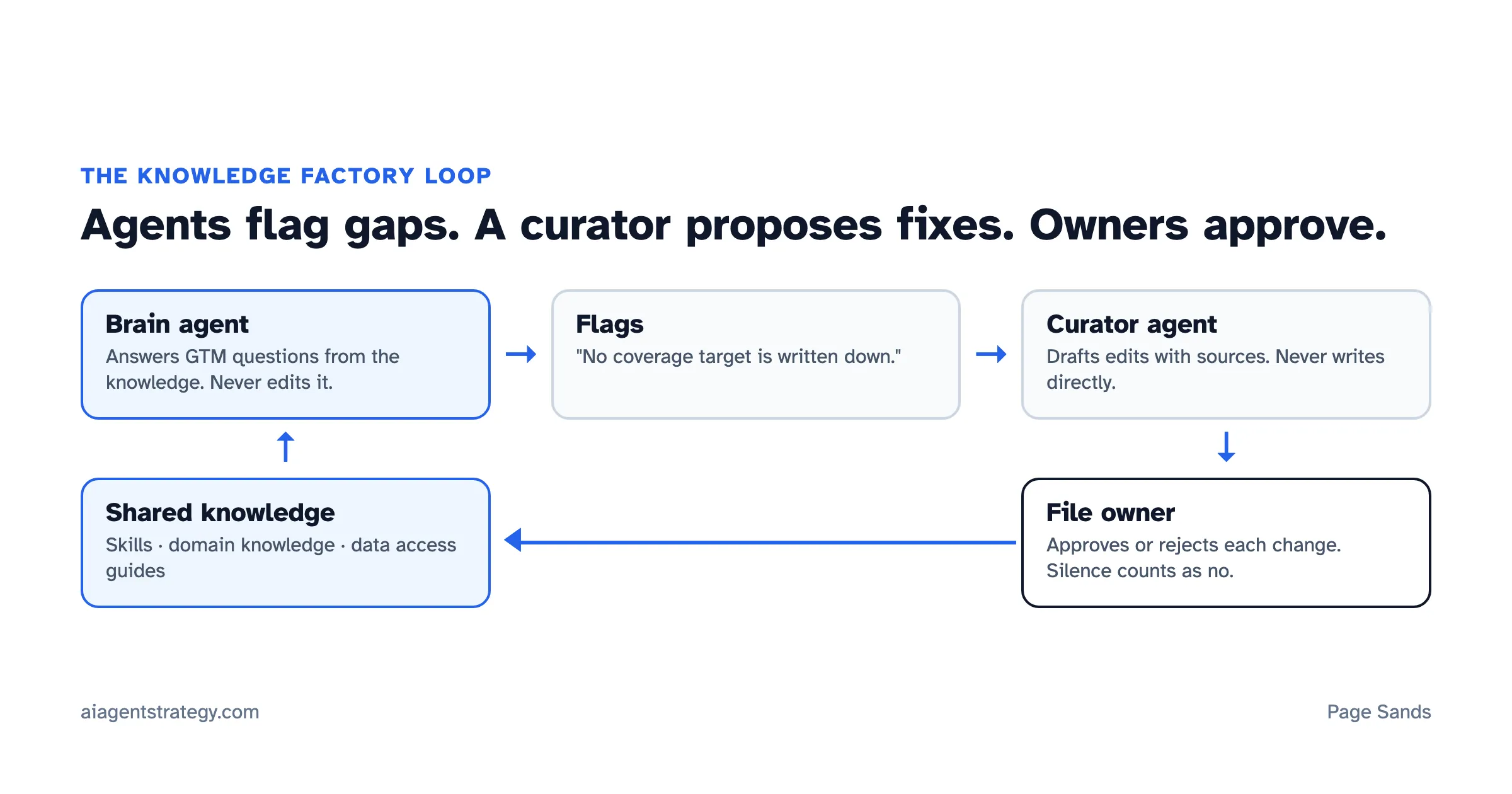
- A LangChain knowledge factory keeps an agent’s company knowledge current. Agents flag gaps, a curator agent proposes fixes, and the owner of each file approves them.
- Claude, GPT, Gemini, and DeepSeek all got the core facts right from the same knowledge files, so the knowledge mattered more than the model. They differed in judgment and cost.
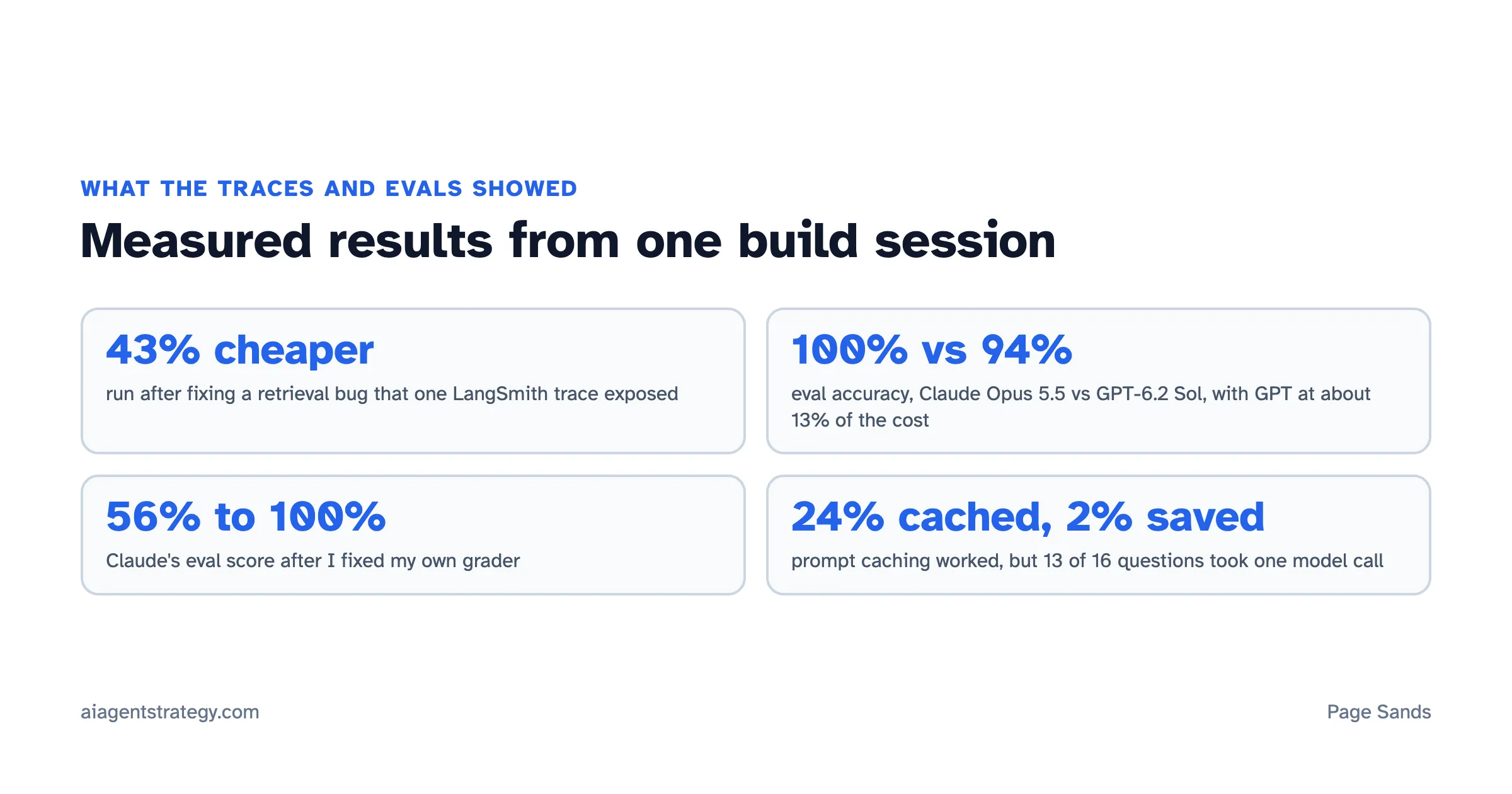
- One LangSmith trace exposed a retrieval bug, and fixing it made that run 43% cheaper.
- Evals caught my mistakes first. My first grader was wrong, and fixing it moved Claude’s score from 56% to 100% before I changed anything in the agent.
- Ownership and evidence rules run as tested Python, and an empty approval counts as a rejection.
What a LangChain knowledge factory is
A LangChain knowledge factory is a system that collects, curates, and maintains the company knowledge an AI agent needs, so the agent answers the way your best-informed employee would. Chase draws a line between context and knowledge. Context is whatever the agent has in front of it while doing a task. Knowledge is the reusable understanding behind the task, like what a metric means, which source to trust, or how your company handles a situation.
He splits that knowledge into three kinds. Skills are procedures for doing a task the way your company expects. Domain knowledge covers definitions, policies, and facts that rarely change. Data access guidance says where current data lives and how to query it, while the data itself stays in its system of record.
The factory is the loop that keeps those three current. Agents that use the knowledge get a tool to flag anything missing or wrong. A separate curator agent runs on a schedule and reads the flags, the raw sources (Notion, Slack, meeting notes), and the traces of past agent runs. Then it updates the knowledge. Chase’s reasoning is that agents focused on their own tasks make messy editors, and the knowledge fills up with contradictions. So the working agents only report problems, and the curator does all the writing.
For GTM teams this maps cleanly onto RevOps. Metric definitions, CRM field meanings, and report procedures are exactly the tacit knowledge that lives in one or two people’s heads.
How I built a company brain with a context layer
Two agents share one folder of markdown files.
knowledge/
  skills/weekly-pipeline-report/SKILL.md   # how to do the work
  domain/metrics.md                        # ARR, pipeline stages, coverage
  domain/company.md                        # plans, owners
  data-access/crm.md                       # which HubSpot fields to use
  sources/inbox/                           # raw notes for the curator
  flags.jsonl                              # gaps the brain reported
  CHANGELOG.md                             # every curator edit
The brain answers questions using that knowledge and never edits it. The curator maintains it. Both run on Claude Opus 5.5 through LangChain, served by a local LangGraph server, and every run is traced to LangSmith.
I picked plain files on purpose. I can read every entry, review every curator edit in git, and fix things by hand. It’s the same markdown-as-memory approach I used for the self-improving content agent on Eve, and Chase makes a similar point. He calls storage the least important piece of the factory.
How the context layer works
On every model call, the brain’s prompt gets rebuilt from the knowledge folder in three tiers.
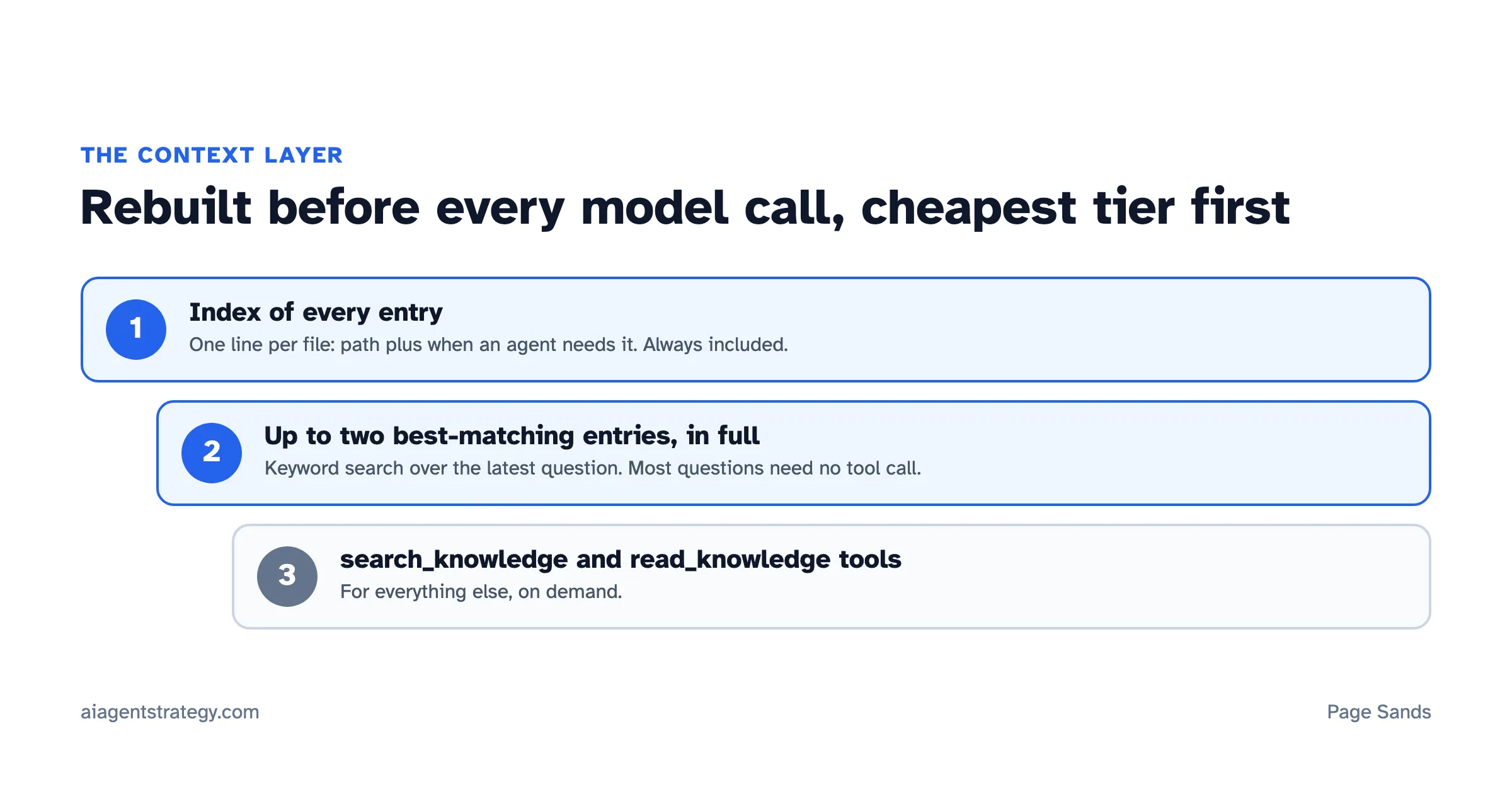
- An index of every entry, one line each, with the file path and a description of when an agent needs it. It’s always included and it’s cheap. The agent knows what exists without loading it all.
- Auto-retrieval inlines up to two entries that best match the latest question, in full. Most questions need no tool call.
- For anything else, the brain has
search_knowledgeandread_knowledgetools.
The rebuild happens in LangChain middleware, a hook that runs before each model call. Because it runs every time, a curator edit shows up in the brain’s next answer with no restart.
Flags and the curator
The brain has a flag_knowledge tool. Its instructions tell it to flag when the knowledge doesn’t cover a question, when an entry looks wrong or stale, or when a user corrects it.
The curator reads three things each run. Open flags, new files in sources/inbox/, and the brain’s recent conversations. It’s told to update an existing entry before creating a new one, cite a source for every fact, and never invent numbers. When it can’t verify a fix, it marks the flag needs_human.
The first loop, run end to end
I seeded knowledge for a fictional B2B SaaS company called Northwind. It got an ARR definition, a HubSpot field guide, and a weekly pipeline report procedure. Then I dropped a fake RevOps meeting note into the inbox. According to the note, ARR excludes one-time onboarding fees starting Dec 1, and a new services_amount field holds those fees. The pipeline report should add a coverage metric and get posted in #sales-leadership. Also, Friday’s lunch order is tacos.
Run 1. I asked the brain whether ARR includes onboarding fees and where the pipeline report gets posted. It inferred “very likely no” from the ARR definition, said plainly that the knowledge didn’t say so directly, and named the person to confirm with. It filed two flags, one for the missing ARR rule and one for the unnamed channel.
The curator pass. It closed both flags using the meeting note as the source. It updated three entries, each with a Sources line, archived the note, and skipped the lunch order. It also left three open questions for a human. Nobody had said which tool #sales-leadership lives in, what the quotas are after Q4, or exactly how “remaining quota” gets calculated.
Run 2. Same question. The brain answered both parts from the updated files, cited them, and filed nothing new.
There was one miss. In run 2 the brain called #sales-leadership a Slack channel. The knowledge never says that, and the curator had specifically declined to write it down, so the brain filled the gap with a guess. My next prompt change is to have the brain file a flag and say it doesn’t know whenever it hits a gap the curator marked for a human.
Two bugs worth knowing about
Parallel tool calls overwrote each other. The curator closed both flags in the same step, as two tool calls running at once. Each call read the flags file, changed its own flag, and wrote the whole file back, so the second write erased the first. The changelog said both flags were resolved while one still read open. I fixed it with a lock around every write, plus a test that closes 20 flags at once. If your agent’s tools write to a shared file, assume they will run in parallel.
The dev server refused synchronous file reads. langgraph dev raised a BlockingError the first time the brain ran, because the context layer read files directly on the server’s event loop. Moving the reads to a worker thread fixed it. Anything you put in middleware runs on every model call, so it has to follow the server’s async rules.
What LangChain is actually doing here
Halfway through, I wasn’t clear on what LangChain was contributing versus Claude. The work splits across four pieces.
| Piece | What it is | Its job in this build |
|---|---|---|
| Claude | The model | Reads the question and the knowledge, decides what to do, writes the answer |
| LangChain | A code library | The agent loop, tool definitions, and the middleware hook behind the context layer |
| LangGraph | Runtime and server | Runs the loop, saves conversations, serves the agents at a URL other programs can call |
| LangSmith | Cloud dashboard | Records every step of every run |
The knowledge factory itself is my own code, about 1,000 lines of Python by the end of the build. It covers the context layer, the flag tool, the curator, the governance rules, and the storage. LangChain supplies the plumbing around it. You could build the same loop by calling Claude directly.
I kept LangChain for two reasons. I want to learn the platform, and the agent can now plug into anything that speaks LangGraph, including LangChain’s own hosted products.
Watching the brain in LangGraph Studio
Studio is LangSmith’s visual debugger. You point it at the local LangGraph server and it draws the agent as a graph. The brain is two boxes, model and tools, with arrows running both ways between them. That loop is the whole agent. The model thinks, calls tools, reads the results, and goes around again until it can answer.
My first question failed twice with a 400 error from Claude saying the user message was empty. I found the real cause in the server log, because Studio later showed the same kind of failure only as “An internal error occurred.” Studio has a Graph mode and a Chat mode, and I was typing into Graph mode’s input panel. That panel is a raw editor for the agent’s state, and my question had ended up in a message labeled as the AI, under an empty human message. Chat mode gives you a normal chat box. I now use Chat to ask questions and Graph to watch what happened.
The bigger lesson came from the retry. Each thread has its own context. A thread saves its full message history, and every new run in that thread starts from where the last one stopped. My broken thread failed again because the empty message was saved in it, so I replayed the mistake. A new thread started clean.
That made the two kinds of memory in this build easy to see. Thread context belongs to one conversation. The knowledge folder is shared by every thread and every user. When the brain flags a gap in one thread, the curator fixes it once, and every thread after that gets the fix. That shared layer is what Chase means by knowledge.
Once the input worked, the runs were worth watching. I asked “how much pipeline do I need to build?” The brain called three tools at once to search the knowledge, read the CRM guide, and check the date. It found that nothing defines a target coverage ratio, so it flagged that and gave me the formula and its inputs without inventing a number. Then I asked who owns the CRM and how to get access. The owner’s name was already in the prompt through auto-retrieval. The brain read the CRM guide for the access rules, then flagged that nobody had written down how to actually request access.
I also tried an interrupt, a pause set before the tools step. The run stopped with the tool call planned but not run. I then typed a new question instead of pressing Continue, which stacked a message on top of an unfinished tool call and broke the thread again. A paused run needs Continue.
What LangSmith traces showed about the context layer
LangSmith records every run as a trace, a tree of each model call and tool call with its inputs, outputs, timing, and cost. In Studio the run tree sits under a small grey “Turns” label that only shows up in Trace view, and it took me a while to find it. Each turn is one question, and expanding it shows every model call and tool call inside. The full trace page in LangSmith has more room for reading long prompts, and the LangSmith Python client is handy when you want the numbers in a table.
I picked the CRM question from the Studio session. The brain got the answer right. The trace showed what that answer cost.
| Before the fix | After the fix | |
|---|---|---|
| Model calls | 3 | 2 |
| Time | 7.3s | 5.5s |
| Tokens | 8,665 | 5,370 |
| Cost | $0.044 | $0.025 |
Input tokens were 93% of the tokens and 72% of the cost. The context layer rebuilds the full prompt (instructions, index, and retrieved entries) on every model call, so a three-call run pays for it three times. LangSmith also showed a 0% cache hit rate. The prompt was identical within the run, so prompt caching looked like an easy win for the second and third calls. I turned it on during the evals step, and the result surprised me.
The bigger find was in the prompt itself. LangSmith shows the exact system message the model received, and the “retrieved for this request” section held the metrics definitions and the company overview. It didn’t include the CRM guide, the one file that answers “how do I get access?” The brain had to spend an extra model call reading it.
The cause was my keyword search. It counted every word longer than two letters, so “who,” “the,” “and,” and “how” all scored, and the longest file in the folder won on volume. I dropped common words, matched whole words only, capped how much a long file can score, and gave extra weight to matches in a file’s name and description. I also added a test for this exact question. The rerun retrieved the CRM guide first and cost 43% less.
It still isn’t perfect. The question says “owns” and the company file says “Owners,” which my search treats as different words, so the brain made one call to read that file. I stopped tuning there. A change that fixes one question can quietly hurt others, and measuring that across many questions is what evals are for.
The lesson I took from this step is that traces show what the agent was given, along with what it said. Both versions of the answer looked fine. Only the trace showed that the first one cost 75% more.
What happened when I swapped Claude for GPT, Gemini, and DeepSeek
LangChain’s main promise is that one agent can run on any model. I tested it with an OpenRouter key, which gives one API key access to models from OpenAI, Google, DeepSeek, and others. LangChain talks to OpenRouter through its standard OpenAI-compatible client.
I made the model a per-run setting. A small piece of middleware checks the run’s settings for a model name and swaps it in before each call. Everything else stays the same, including the knowledge, the context layer, the tools, and the instructions. In Studio this shows up as assistants, which are saved setups of the same graph. I created one called “brain (GPT)” by typing a model name into a box Studio generated from the agent’s settings.
That box produced the one bug of this step. My pasted model name carried a leading space, and OpenRouter rejected “ openai/gpt-6.2-sol” as an unknown model. The brain now trims whitespace from the model name, and a test covers it.
Then I asked all four models the same three questions.
| Model | Cost for 3 questions | Time per question | How it did |
|---|---|---|---|
| Claude Opus 5.5 | about $0.16 | 6 to 13s | Most thorough. It was the only one to say outright that the ARR rule wasn’t in effect yet. |
| GPT-6.2 Sol | about $0.03 | 3 to 8s | Accurate and short. It answered the ARR question with no tool calls, straight from the retrieved context. |
| Gemini 4 Neon | about $0.08 | 6 to 37s | Correct and detailed, but long, and it ignored “keep answers short.” One answer took 37 seconds. |
| DeepSeek V4.1 Flash | about $0.003 | 3 to 7s | Cheap and fast. On the pipeline question its entire answer was that it had flagged a gap. |
Every model named the right CRM owner and got the ARR rule right. The context layer handed all four the same files, and even the cheapest model got those facts right. That’s the strongest case I’ve seen for putting your effort into the knowledge first.
Judgment was where they split. Claude and Gemini both mentioned the Dec 1 start date, and Claude spelled out that today’s ARR numbers still fall under the old rule. GPT gave the most efficient answers. DeepSeek dropped an answer and filed a flag claiming two dates contradicted each other, when one was the date a CRM field was added and the other was the date a policy starts.
Those flags all land in the same queue. After this round there were nine open, and some of them are wrong. Any model you put in front of the knowledge feeds the curator, so the curator has to judge which flags are real. That makes governance a model-selection question too.
What LangSmith evals caught that reading answers didn’t
Every comparison so far had been a few questions judged by eye. Evals make it repeatable. I built a LangSmith dataset of 16 Northwind questions, each with a reference answer taken from the knowledge files. Two of them have no documented answer (“What’s our target pipeline coverage ratio?”), to check whether a model invents one.
Each run gets four grades. Claude Sonnet 5.5 acts as a judge and decides whether the answer is correct. Three simple checks cover the rest. One confirms the answer cites the right knowledge file, one confirms auto-retrieval put that file in the prompt, and one counts the model calls. The brain runs against a copy of the knowledge folder during evals, so the flags it files never reach the real curator.
The first scores were wrong, and the fault was mine. Round one said Claude was correct 56% of the time and GPT 60%. The judge’s comments explained why. It marked answers down for “adding details the reference does not support,” like naming Marcus Lee or listing the HubSpot fields. Those details were true and came straight from the knowledge files. The judge had only seen my one-line reference answer, so it treated anything extra as invented. I gave the judge the knowledge files themselves and re-graded the same runs without calling the brain again. Claude went to 100% and GPT to 93%.
A second problem was also mine. GPT’s one remaining miss was on “How should numbers be formatted in the weekly pipeline report?” My reference also required the 200-word limit, which is about report length. I split that into two questions. And one GPT run never finished, because new OpenRouter accounts are capped at 20 requests a minute for that model. I added retries and lowered the concurrency.
Once the grader and the dataset were fixed, the evals found real things.
- Retrieval missed one question on both models. For “Who is the CRM admin?” the CRM guide and the metrics file beat the company file, because “CRM” appears in all three and the search weighted every word equally. I made rare words count for more and added crude stemming so “owns” matches “Owners.” Retrieval went to 100% on both models.
- Prompt caching worked and saved almost nothing. After I turned it on, 24% of Claude’s input tokens came from cache, but cost for the 16 questions only moved from $0.297 to $0.291. Thirteen of the 16 questions were answered in one model call, so there was rarely a second call to reuse the cache. Good retrieval and caching both attack the same repeated prompt, and once retrieval was fixed there wasn’t much left for caching to save.
- Neither model invented an answer to the two undocumented questions. Both said the number wasn’t recorded and pointed to Marcus Lee.
| Claude Opus 5.5 | GPT-6.2 Sol | |
|---|---|---|
| Correct (after fixing the judge) | 100% | 94% |
| Retrieval found the right file | 100% | 100% |
| Model calls per question | 1.3 | 1.6 |
| Cost for 16 questions | $0.29 | $0.04 |
For a team weighing models, that’s a concrete trade. GPT gets one fact wrong in 16 for about 13% of the cost. Whether that’s acceptable depends on the question, and the eval puts an actual number on it.
The brain’s runs across both rounds cost $0.67 in total. I didn’t trace the judge’s calls, and my rough estimate puts them at about another dollar.
Who governs company context
By this point the brain was filing flags from four different models, and some of those flags were wrong. The curator could still rewrite any knowledge file on its own. That raised the question I care about most as a GTM operator. Who decides what becomes company knowledge?
I settled on three tiers. Each conversation keeps its own context. Shared knowledge lives in the folder, and only the curator writes to it. Every shared file has an owner, so Dana Ruiz owns the metric definitions, Priya Shah owns the CRM guide, and Marcus Lee owns the pipeline report procedure. A change reaches shared knowledge only through one path, from a flag to a curator proposal to the owner’s approval to a commit.
Rebuilding the curator as a LangGraph graph
The first curator was LangChain’s prebuilt agent loop, where the model decides what to do next. For governance I wanted fixed steps, so I rebuilt it as a hand-built LangGraph graph with five nodes.
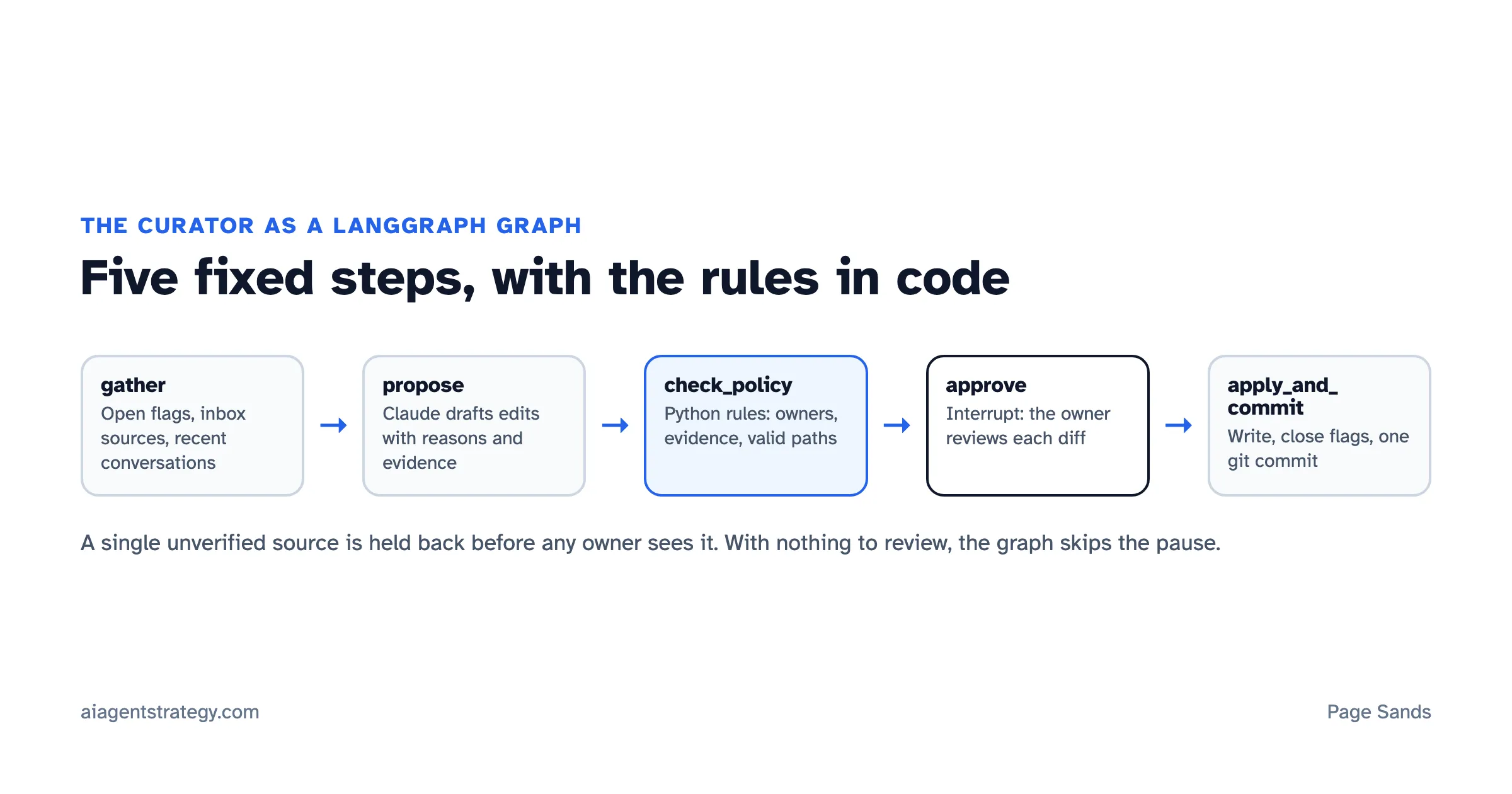
- gather collects open flags, new files in the inbox, and recent brain conversations.
- propose has Claude draft edits as proposals, each with its reason, its sources, and a label for its evidence. It never writes a file.
- check_policy applies the rules in plain Python. An edit can’t change a file’s owner. An edit backed by a document or by the owner’s own statement goes to the owner for review. One backed by a single person’s remark, or only by something an agent noticed, is held until a second source backs it up.
- approve pauses the graph with a LangGraph interrupt and shows each owner the diff of their file. Anything not explicitly approved counts as rejected.
- apply_and_commit writes the approved edits, closes the flags, archives the sources it used, and makes one git commit per run.
Writing the rules in code means a prompt can’t talk its way around them, and they have tests.
For the proposals I asked LangChain for structured output with method="json_schema", which uses the Claude API’s structured outputs feature. I chose it because Claude Opus 5.5 rejects forced tool calls, and forcing a tool call is the classic way to get structured output. LangChain’s default method turned out to handle that too. It checks for models like Opus 5.5 and avoids forcing the call.
The first runs
The first run had nine open flags and no new sources. It proposed nothing. It marked eight flags for a human, named who should answer each one, and noticed that five were the same missing coverage target. It rejected the flag DeepSeek had filed about a “contradiction” between two dates, and explained that one date was when a CRM field was added and the other was when a policy starts.
Then I did what would happen next in real life. I dropped a Slack export into the inbox. In it, Marcus answered the coverage question (3x remaining quota) and Priya described the CRM access process. A sales rep also said, as a personal opinion, that reports should use $M instead of $K, and someone corrected the lunch order.
The curator proposed two edits, one to Dana’s metrics file and one to Priya’s CRM guide. It never proposed the rep’s $M idea or the lunch order. That was the model’s own judgment, so the code-level rule never had to step in. I’d still rather have both layers.
My first approval attempt rejected everything. Studio’s resume box starts with a pair of empty quotes, and I clicked Resume without replacing them. The curator received an empty answer, treated it as a no, and committed a record of two rejections. That’s the default I wanted, even if I tripped over it.
On the second run I approved the metrics edit and rejected the CRM edit to see both paths. The commit touched exactly two files, the metrics definitions and the changelog. Then I asked the brain what coverage to target. It said 3x remaining quota, set by Marcus Lee on Nov 22, and cited the file.
Every step of that loop now leaves a record. Each flag names who has to answer it, each proposal shows its evidence, and each change is a commit that I can read or revert.
One gap remains. The evidence labels come from the model, and the policy trusts them. A careless label could send a weak change to an owner as if it were well sourced. The owner still has to approve it, but the next improvement is checking evidence in code too, for example by confirming the quoted source actually says what the proposal claims.
Deploying the company brain to LangSmith
Until this step, both agents ran on my laptop. Deploying them gives the brain a permanent URL that other LangChain apps and LangSmith’s own products can connect to.
Most of the code carried over as it was, with storage as the exception. Deployed agents can run on several machines at once and have no shared disk, so a folder of markdown files stops working. I added a second storage backend that keeps the knowledge, flags, sources, and changelog in LangGraph’s built-in store, which is Postgres in a deployment. On first use it loads the knowledge files that ship with the code. Locally I still use plain files, so the git history and evals work as before. I tested the store version on a local server before deploying. A curator approval there changed the brain’s answers without touching a single file on disk.
There’s one trade-off. A deployment has no git repo, so the deployed curator’s record of each run is a changelog in the store. The commit-per-run history only exists in the local version for now.
LangChain’s langgraph deploy command builds the image in LangSmith’s cloud, so I didn’t need Docker. It also uploads the variables from an env file as encrypted secrets, so I kept a separate, git-ignored file with only what the deployment needs. Two attempts failed before anything was built. The first couldn’t find my LangSmith key. The command looks in the env file named in the deployment config and in the shell environment, and my key was only in the project’s main .env file. The second stopped because hosting wasn’t enabled for my LangSmith organization, and it worked after I moved to a paid plan. The third built and deployed in about three minutes.
Against the live URL, Claude answered the coverage question with the 3x target and the right owners. The same deployment answered on GPT when I switched the model in the run’s settings. The deployed curator read the store, found the Slack export still waiting in its inbox, and paused with the CRM edit for Priya Shah to approve. I approved it there, and the live brain now walks people through the HubSpot access process and cites the file.
That left three copies of the knowledge, on my laptop, in the deployment, and on GitHub, and they had drifted apart. I wrote a small sync script for it. It compares each file with the state recorded at the last sync. A change on one side gets copied to the other, and a change on both sides gets reported as a conflict instead of overwriting anything. Flags and the changelog merge. After a sync it commits and pushes to GitHub, so all three copies match.
One more gotcha came up. LangChain’s RemoteGraph, the piece another app uses to call a deployed agent, doesn’t pick up your API key from the environment the way the SDK client does. You have to pass it in, or the deployment rejects the call with “Missing authentication headers.”
Where to start with your own knowledge factory
Pick one recurring GTM workflow that keeps going wrong in small ways. The weekly pipeline report is a good candidate. Write down the three to five things a new hire would get wrong, like the metric definitions, the right CRM fields, and where the report goes.
Give your agent a way to flag gaps before you build a curator. A week of flags shows you which knowledge is actually missing, and you can play curator yourself until the pattern is clear. Even if you never automate the curator, that list of flags tells you what to write down next. A LangChain knowledge factory is one way to automate the rest of the loop.
Frequently asked questions
What is a LangChain knowledge factory?
A LangChain knowledge factory is a system that keeps an AI agent's company knowledge current. Agents that use the knowledge flag gaps and errors, a curator agent drafts fixes from sources like Slack and meeting notes, and the owner of each knowledge file approves the changes. LangChain's Harrison Chase described the pattern in November 2026.
What is the difference between context and knowledge for AI agents?
Context is what an agent has in front of it during a task. Knowledge is the reusable understanding behind the task, such as what a metric means, which data source to trust, and how the company handles a situation. A context layer decides which knowledge goes into the prompt for each question.
Do you need LangChain to build a knowledge factory?
No. The knowledge factory logic in my build is about 1,000 lines of my own Python, and the same loop could call Claude directly. LangChain supplied the agent loop, LangGraph supplied the server and deployment, and LangSmith supplied traces and evals.
Which model works best for a company brain agent?
On my 16-question eval, Claude Opus 5.5 scored 100% and GPT-6.2 Sol scored 94% at about 13% of the cost. All four models I tried, including Gemini and DeepSeek, named the right CRM owner and ARR rule from the same knowledge files, so the knowledge mattered more than the model.
How do you stop an AI agent from changing company knowledge without approval?
Keep the working agents read-only and give them a tool to flag problems. Route every change through a curator that only proposes edits, enforce ownership and evidence rules in code, and pause for the file owner's approval with a LangGraph interrupt. Treat an empty answer as a rejection.
How much does a company brain agent cost to run?
In my LangSmith traces on Claude Opus 5.5, a question cost between about $0.01 and $0.06, depending on how many tool calls it needed. The full 16-question eval cost $0.29 on Claude and $0.04 on GPT-6.2 Sol. Hosting the agents on LangSmith required a paid plan.